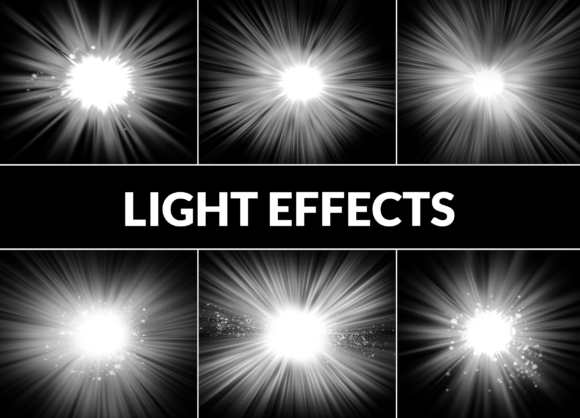
Light Effect Pack: Elevate Your Digital Designs
In the fast-paced world of digital design, the difference between a flat image and a captivating visual often comes down to lighting. Light dictates mood, directs the viewer’s eye, and adds a layer of professionalism that is difficult to achieve from scratch. This is where a Light Effect Pack becomes an indispensable tool in your creative arsenal. By integrating high-quality, pre-rendered light elements into your workflow, you can instantly transform ordinary compositions into extraordinary experiences.
The specific pack we are exploring today offers six meticulously crafted PNG light elements, each designed to infuse your designs with mesmerizing luminosity and depth. With a resolution of 3000 x 3000 pixels, these assets are not just decorative add-ons; they are powerful tools for storytelling. Whether you are a seasoned graphic designer, a photographer looking to enhance your portraits, or a social media manager aiming to stop the scroll, understanding how to leverage these ethereal touches can significantly elevate your output.
Why High-Resolution PNGs Matter in Modern Design
Before diving into creative applications, it is crucial to understand the technical advantage of this format. The included files are PNGs with transparent backgrounds, rendered at a substantial 3000 x 3000 pixels. This resolution ensures that when you scale the elements down for a mobile screen or up for a large print poster, the edges remain crisp and the gradients smooth.
Unlike JPEGs, which compress data and often introduce artifacts around delicate light rays, PNGs preserve the subtle nuances of transparency. This allows for seamless blending modes in software like Adobe Photoshop, Affinity Photo, or Procreate. You are not fighting against a white box background; you are working with pure light data that interacts naturally with the layers beneath it. This technical foundation gives you the freedom to experiment without worrying about quality loss.
Creative Applications Across Industries
The versatility of a Light Effect Pack means it serves multiple industries and creative goals. Here is how different professionals can adapt these six unique elements to their specific needs.
Photography Enhancement
For photographers, lighting is everything. However, natural light is unpredictable, and studio setups can be time-consuming. These light overlays provide a practical solution for post-production. Imagine a portrait taken on an overcast day. By adding a warm, directional lens flare from the pack, you can simulate the golden hour, adding warmth and emotion to the subject’s face. For wedding photography, soft, diffused glows can create a romantic, dreamlike atmosphere that clients love. The key is subtlety; use the opacity slider to blend the effect until it feels organic rather than applied.
Digital Art and Illustration
Digital artists often spend hours painting light sources manually. Using a Light Effect Pack can speed up this process while maintaining high quality. If you are creating fantasy character art, placing a magical glow behind a weapon or a spell effect can add immediate impact. For sci-fi illustrations, sharp, geometric light leaks can suggest neon cityscapes or futuristic interfaces. Because the elements are high-resolution, you can zoom in and paint over parts of the light to integrate it further with your character, ensuring the light appears to wrap around objects rather than just sitting on top.
Marketing and Social Media Graphics
In the crowded feed of Instagram or LinkedIn, visuals need to pop. Marketers and small business owners can use these light effects to highlight product shots. A simple bottle of perfume or a piece of jewelry can look mundane against a plain background. Adding a subtle sparkle or a soft beam of light draws the eye directly to the product, suggesting luxury and quality. For event promotions, dynamic light streaks can convey energy and excitement, making the graphic feel alive and urgent.
Strategies for Seamless Integration
To get the most out of your Light Effect Pack, you need more than just drag-and-drop skills. You need a strategic approach to blending. Here are three practical techniques to ensure your results look professional and cohesive.
- Master Blending Modes: Do not leave the layer on "Normal." Experiment with modes like Screen, Add, or Overlay. Screen mode is typically the best for removing black backgrounds and keeping only the bright parts of the light, while Overlay can help the light interact with the textures of the underlying image.
- Color Grading Consistency: Light has color temperature. If your base image is cool and blue-toned, a warm orange light effect might look disjointed unless adjusted. Use hue/saturation adjustment layers clipped to the light element to match the color palette of your project. This ensures the light feels like it belongs in the same environment as the subject.
- Masking for Depth: Real light interacts with objects. If a light source is behind a person, it should not shine through their solid body. Use a layer mask to erase parts of the light effect that should be obscured by foreground elements. This simple step adds significant depth and realism to your composition.
Project Ideas to Ignite Your Creativity
If you are staring at a blank canvas, here are a few concrete project ideas to help you start using your new assets immediately.
- The Ethereal Portrait: Take a black-and-white portrait and add a single, colorful light leak across the eyes. This creates a striking contrast and focuses attention on the subject’s gaze.
- Product Launch Teaser: Create a dark, moody background for a new tech gadget. Use sharp, bright light elements to outline the silhouette of the product, building anticipation without revealing every detail.
- YouTube Thumbnail Boost: Add a subtle glow behind the main subject of your thumbnail to separate them from the background. This increases readability and click-through rates by improving visual hierarchy.
- Wedding Invitation Suite: Use soft, diffuse light orbs to create a gentle, romantic border for digital invitations. It adds a touch of elegance without overpowering the typography.
Maintaining Originality and Quality
One common concern with using preset assets is the fear of looking generic. Since this pack contains six distinct elements, the risk of overuse is low if you are mindful. To keep your work original, treat these light effects as ingredients, not the entire meal. Combine them with other textures, adjust their shape with transformation tools, and always prioritize the narrative of your design.
Furthermore, consistency is key for branding. If you are a content creator, choose one or two light styles from the pack and stick to them across your posts. This creates a recognizable visual signature. Your audience will begin to associate that specific luminous quality with your brand identity.
Ultimately, a Light Effect Pack is about efficiency and enhancement. It allows you to focus on the bigger picture of your design while handling the complex physics of light rendering for you. By integrating these high-resolution PNGs into your workflow, you are not cutting corners; you are smartly leveraging tools to produce higher-quality work in less time. Whether you are crafting otherworldly digital artworks or designing captivating graphics for web and print, these light effects provide the spark needed to take your creations to new levels of visual splendor.